Introduction
After writing new content, committing the markdown, and pushing to GitHub, my Astro build pipeline runs.
Since my site is built with Astro, I have a custom integration I’ve written which runs at the end of the build process and cross-posts the markdown content of my articles to DEV and Hashnode.
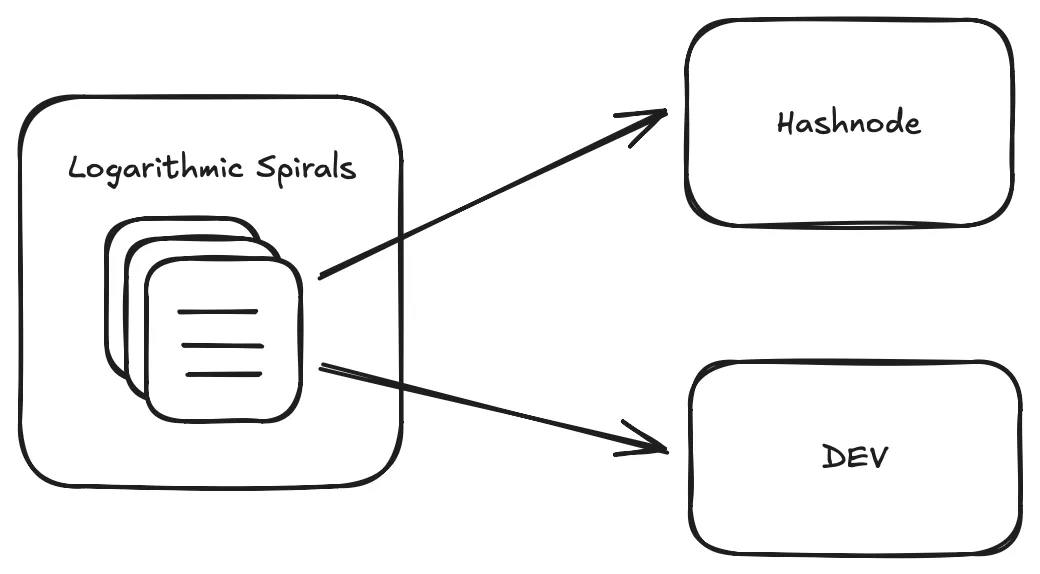
This workflow works, but the biggest friction point is images — specifically, how Astro handles them inside Markdown.
Why I Needed Better Markdown Image Handling
Since I am cross-posting the raw markdown to other platforms, the markdown content includes image URLs relative to my project file system. When building the site, Astro automatically converts these relative URLs to canonical URLs with the site domain as the base.
Here’s an example of what these image URLs in the markdown look like:
However, these relative URLs don’t work outside of the build context. This is what my publishing workflow looked like before automation:
- Write new content.
- Commit and push to GitHub.
- Wait for the build to complete.
- Go to DEV and Hashnode.
- Edit the drafts to replace the relative image URLs with the live URLs from my site.
- Publish the drafts.
Unfortunately, this process is repetitive, time-consuming, and error-prone. Naturally, I’ve been wanting to fully automate this process to remove the draft creation and editing. My goal is to be able to immediately create a draft, and have it be published without my intervention. I also want updates in my repo to automatically sync to other platforms without breaking images.
To achieve these things, I needed to create stable image URLs which can replace the relative URLs in the raw markdown before it gets cross-posted.
The Issue With Astro’s Default Behavior
Astro converts Markdown images into optimized formats (like WebP) and places them in dist/, but it does not copy the original files.
Additionally, Astro adds hashes to the file names which are unstable. One of the issues I encountered in the past is the hashes can change between Astro versions and builds. Unfortunately, this means image links on other sites can become broken over time.
Here’s how a typical file gets transformed during build:
./image.png → dist/_astro/image.2db932.webp → https://logarithmicspirals.com/_astro/image.2db932.webpWhen I would export the markdown to other sites, I would have to manually modify all the images to use the built image files.
My Solution to the Problem
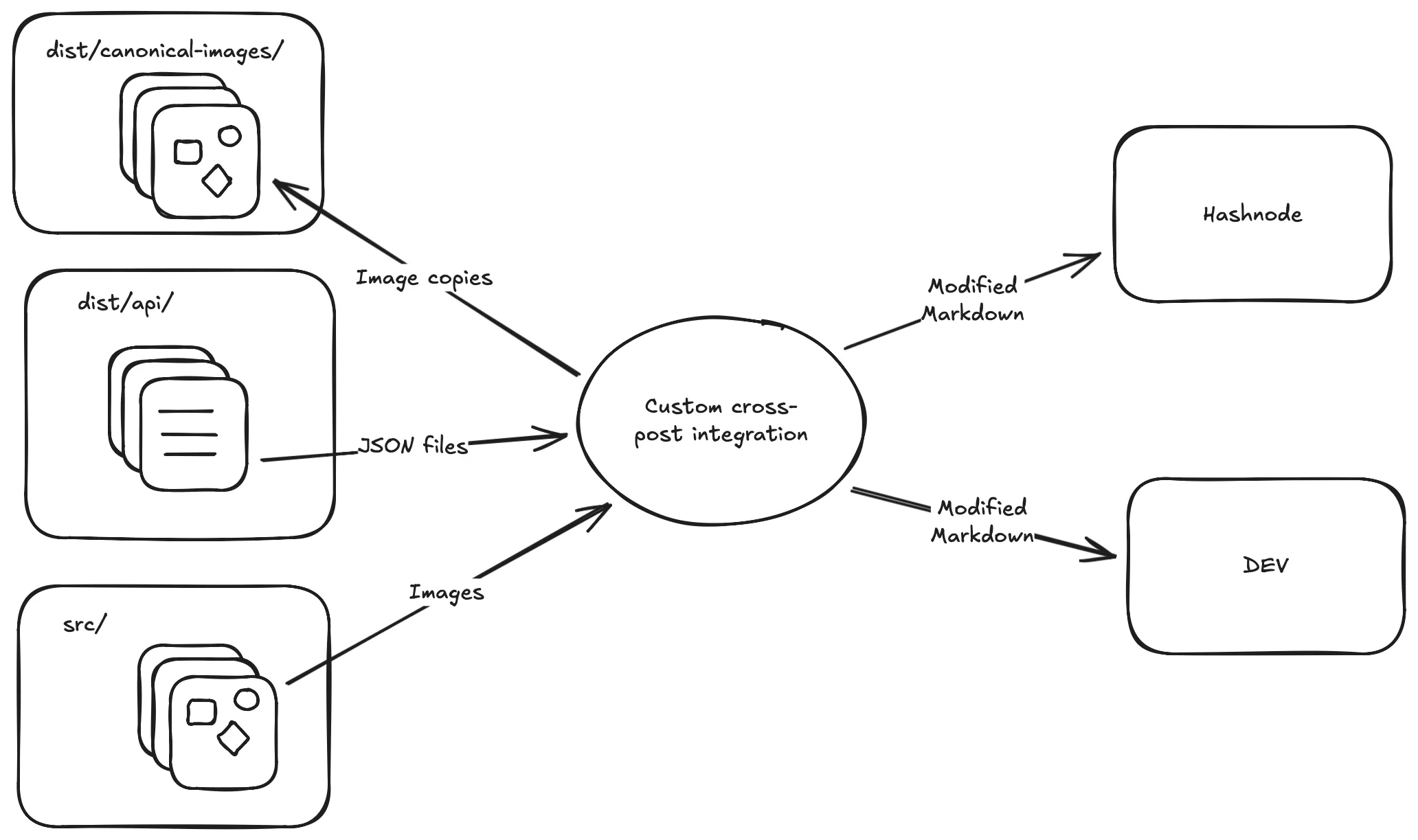
To solve this problem, I came up with the following solution:
- Expose the markdown in a way which can be accessed within the integration.
- Read the markdown file and extract the image URLs.
- Convert the filesystem-relative image URLs to absolute filesystem URLs.
- Hash the image based on content.
- Copy the image file to
dist/canonical-images/${name}.${hash}${extension}. - Rewrite the URL in the markdown.
- Cross-post the modified markdown to other sites.
Modifying My Custom Integration
One of the first things I had to do was create a service class for modifying strings containing markdown content. Here’s what my service class looks like:
class RemarkRemapImages {
  // Private instance variables

  constructor(
    private readonly logger: AstroIntegrationLogger,
    private readonly dir: URL, // The build output directory.
    siteUrl: string,
  ) {
    // Assign the instance variables.
  }

  async remapImages(markdown: string, filePath: string): Promise<string> {
    // Given markdown content and its path on the disk,
    // convert the relative URLs to absolute URLs.
  }
}
Since this class is intended to be managed by the cross-post integration, I’m passing the integration logger provided by the Astro framework to the constructor.
I’m keeping the implementation details out of this post to stay focused on the higher-level architecture. The real implementation handles AST traversal, hashing, file copying, and URL rewriting. The goal is simply to show how the integration manages Markdown processing through a dedicated service class.
In my codebase, I am also passing this into the DEV and Hashnode client classes I have created. Here’s an example showing the DEV client:
// The DevClient class is for non-integration and
// non-authenticated use cases.
class DevIntegrationClient extends DevClient {
  constructor(
    private readonly apiKey: string,
    private readonly remarkRemapImages: RemarkRemapImages,
    private readonly logger: AstroIntegrationLogger,
  ) {
    super();
  }

  async createDevDrafts(devDrafts: DevDraft[]) {
    // ...
    for (let i = 0; i < devDrafts.length; i++) {
      // ...
      const resultStatus = await this.createDraft(devDraft);
      // ...
    }
    // ...
  }

  async createDraft(devDraft: DevDraft) {
    try {
      const response = await fetch(`https://dev.to/api/articles`, {
        // Headers, etc
        body: JSON.stringify({
          article: {
            // ...
            body_markdown: await this.remarkRemapImages.remapImages(
              devDraft.body_markdown,
              devDraft.filePath,
            ),
            // ...
          }
        }),
      });
      // ... Returns response.status
    } catch (e) {
      this.logger.error(JSON.stringify(e));
    }

    return undefined;
  }
}
Lastly, these classes are wired together via the custom integration:
const crossPost = (siteUrl: string): AstroIntegration => {
  let routes: IntegrationResolvedRoute[];

  return {
    name: "cross-post",
    hooks: {
      "astro:routes:resolved": (params) => {
        routes = params.routes;
      },
      "astro:build:done": async ({ assets, logger, dir }) => {
        const remarkRemapImages = new RemarkRemapImages(logger, dir, siteUrl);

        // ... Get the DEV cross-post JSON.

        if (devJson) {
          // ...
          const token = process.env.DEV_API_KEY;

          if (token) {
            // A factory function constructs the service object.
            const devIntegrationClient = createDevIntegrationClient(
              token,
              remarkRemapImages,
              logger,
            );
            await devIntegrationClient.createDevDrafts(data);
          } else {
            // ...
          }

          // ...
        } else {
          // ...
        }
      }
    }
  };
}
The Outcome
By generating stable, content-based URLs for every Markdown image, each file now has a permanent location that won’t change across builds or Astro versions. This ensures that cross-posted Markdown renders correctly on platforms like DEV and Hashnode without breaking image links. Because the URLs no longer depend on Astro’s internal asset pipeline or its hashed filenames, updates to posts can be published confidently and consistently across platforms.
Conclusion
By generating stable, content-based URLs for every Markdown image, I finally removed the most fragile part of my cross-posting pipeline. Now I can publish and update posts across platforms without worrying about broken links or manually fixing image paths.
This improvement is a key step toward fully automating my publishing workflow. In a future post in this series, I’ll cover how I handle syncing updates and keeping external platforms consistent with my Astro content.