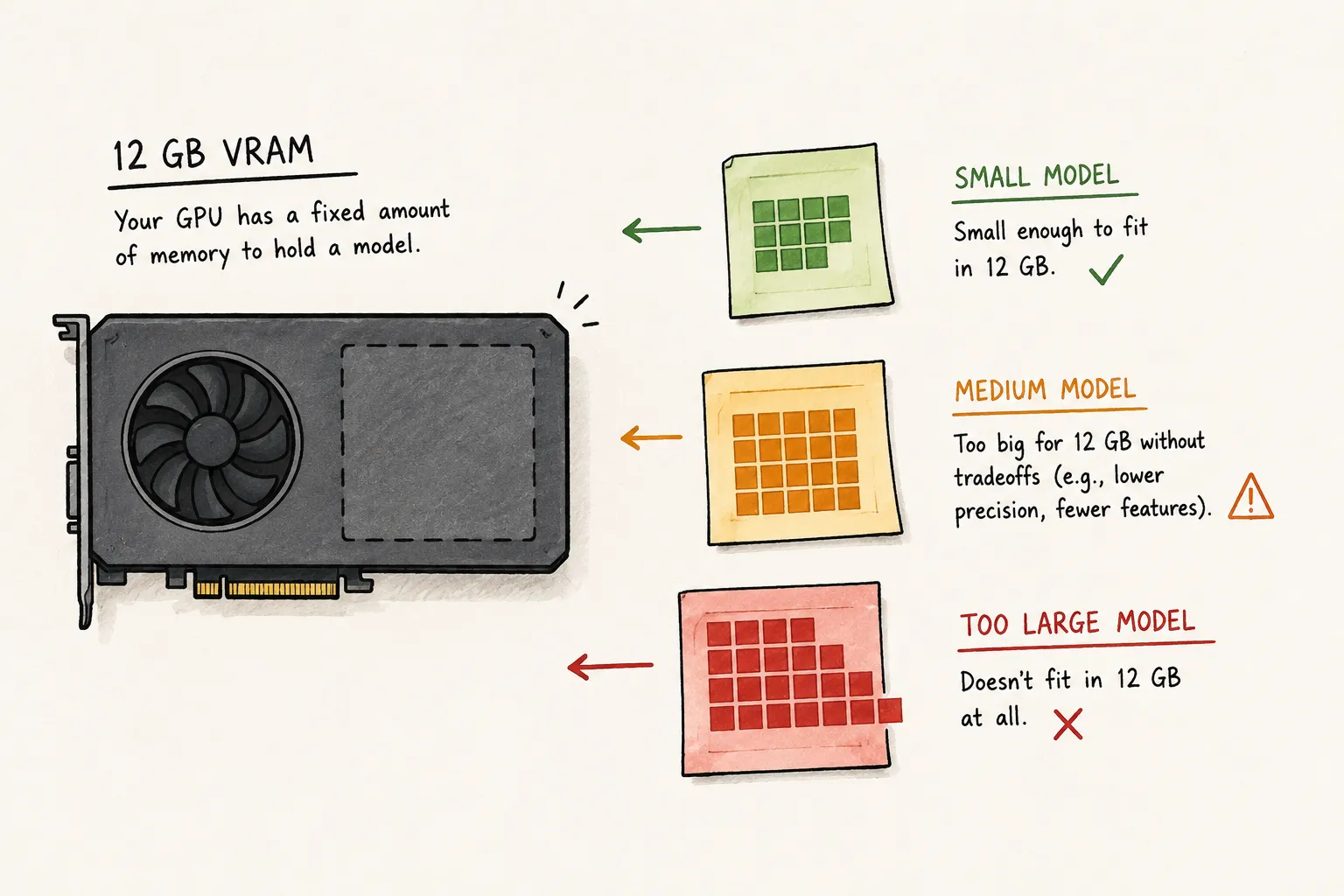
Quick Answer
A 12 GB GPU can comfortably run many current small and mid-sized quantized LLMs entirely in VRAM, including Gemma 4 E4B, Qwen3 8B, DeepSeek R1 Distill Qwen 7B, Ministral 8B, and Qwen2.5-Coder 7B in my testing.
On an RTX 4070 Ti with 12 GB of VRAM and 32 GB of system RAM, Gemma 4 E4B is the strongest all-around starting point from my tests: it stayed fully GPU-resident at 32K context while using 6.2 GB of VRAM and generated 88.5 tokens per second.
Current Calculator Picks for an RTX 4070 Ti 12 GB
This Ollama RTX 4070 Ti benchmark snapshot was captured on August 15, 2026. As a starting point, I used my LLM VRAM calculator, set to an RTX 4070 Ti and 32 GB of RAM, to get some initial estimates. The VRAM and speed columns are calculator estimates for that profile, not vendor requirements or measured benchmarks. Re-run the LLM VRAM Calculator & Local AI GPU Planner before choosing a model because its current model data and your settings can change the order.
| Model | Best use | Planner rating | Planner VRAM estimate | Estimated output speed | Maximum context | 12GB verdict |
|---|---|---|---|---|---|---|
| google/gemma-4-E4B-it | General chat and local assistants | 70.21 | 5.9 GB | 73.5 tok/s | 131072 tokens | Runs well |
| Qwen3 8B | Chat RAG and agent experiments | 65.73 | 10.3 GB | 71.8 tok/s | 40960 tokens | Runs well |
| Qwen3-VL-8B-Instruct | Image-aware workflows | 64.97 | 10.7 GB | 67.1 tok/s | 262144 tokens | Poor |
| Ministral 8B Instruct | Chat and RAG alternative | 64.69 | 10.2 GB | 73.3 tok/s | 32768 tokens | Runs well |
| DeepSeek R1 Distill Qwen 7B | Reasoning | 63.45 | 7.0 GB | 77.2 tok/s | 131072 tokens | Runs great |
| google/gemma-4-E2B-it | Smaller faster local tasks | 62.28 | 4.8 GB | 114.8 tok/s | 131072 tokens | Runs great |
| Qwen2.5-Coder 7B Instruct | Good for faster responses to simple coding tasks | 62.00 | 7.0 GB | 196.0 tok/s | 32768 tokens | Runs great |
Gemma 4 E4B is the strongest general-purpose recommendation in this snapshot. Qwen3 8B is the main alternative for chat, RAG, and agent experiments. DeepSeek R1 Distill Qwen 7B leaves more memory headroom for reasoning workloads, while Gemma 4 E2B is the smaller, faster option. Qwen3-VL-8B-Instruct is for image-aware workflows, but it may not achieve full GPU fit under some workloads.
To evaluate how well those calculator estimates held up in practice, I benchmarked the models on my RTX 4070 Ti system.
Real World Comparison
To help gather data for this article, I ran benchmark tests on my PC with the following specs:
- GPU: RTX 4070 Ti
- CPU: AMD Ryzen 5 5600
- RAM: 32 GB DDR4
- OS: Windows 11
- Ollama: 0.32.13
The tested Ollama tags were gemma4:e4b, qwen3:8b, deepseek-r1:7b, qwen2.5-coder:7b, nchapman/ministral-8b-instruct-2410:latest, qwen3-vl:8b, and gemma4:e2b.
Each model was tested three times with num_ctx configured to 8K and 32K. The prompts did not fill those windows equally: the 8K runs used roughly half of the available context, while the 32K runs began around 92% full. Each test used Q4_K_M quantization and a cold start, and I report the median of the three runs.
| Model | Context | Peak VRAM | Output tok/s | GPU Utilization | CPU Utilization |
|---|---|---|---|---|---|
| qwen3:8b | 8K | 7.5 GB | 67.7 | 100% | 0% |
| qwen3:8b | 32K | 10.8 GB | 52.0 | 100% | 0% |
| gemma4:e4b | 8K | 5.8 GB | 95.4 | 100% | 0% |
| gemma4:e4b | 32K | 6.2 GB | 88.5 | 100% | 0% |
| deepseek-r1:7b | 8K | 6.4 GB | 80.8 | 100% | 0% |
| deepseek-r1:7b | 32K | 7.8 GB | 72.2 | 100% | 0% |
| qwen2.5-coder:7b | 8K | 6.4 GB | 82.2 | 100% | 0% |
| qwen2.5-coder:7b | 32K | 7.8 GB | 71.6 | 100% | 0% |
| nchapman/ministral-8b-instruct-2410:latest | 8K | 7.2 GB | 72.5 | 100% | 0% |
| nchapman/ministral-8b-instruct-2410:latest | 32K | 10.5 GB | 55.3 | 100% | 0% |
| qwen3-vl:8b | 8K | 9.1 GB | 70.3 | 100% | 0% |
| qwen3-vl:8b | 32K | 11.3 GB | 16.1 | 82% | 18% |
| gemma4:e2b | 8K | 3.9 GB | 155.9 | 100% | 0% |
| gemma4:e2b | 32K | 4.1 GB | 146.9 | 100% | 0% |
The table above is the cold-start Ollama measurements. The comparison below shows where the calculator matched those measurements and where it was optimistic at 32K context.
| Model | Planner rating | Planner VRAM | Measured VRAM | VRAM difference | Planner output tok/s | Measured output tok/s | Speed difference | Full GPU Offload? |
|---|---|---|---|---|---|---|---|---|
| google/gemma-4-E4B-it | 70.21 | 5.9 GB | 6.2 GB | +0.3 GB | 73.5 | 88.5 | +15.0 | Yes |
| Qwen3 8B | 65.73 | 10.3 GB | 10.8 GB | +0.5 GB | 71.8 | 52.0 | -19.8 | Yes |
| Qwen/Qwen3-VL-8B-Instruct | 64.97 | 10.7 GB | 11.3 GB | +0.6 GB | 67.1 | 16.1 | -51.0 | No |
| Ministral 8B Instruct | 64.69 | 10.2 GB | 10.5 GB | +0.3 GB | 73.3 | 55.3 | -18.0 | Yes |
| DeepSeek R1 Distill Qwen 7B | 63.45 | 7.0 GB | 7.8 GB | +0.8 GB | 77.2 | 72.2 | -5.0 | Yes |
| google/gemma-4-E2B-it | 62.28 | 4.8 GB | 4.1 GB | -0.7 GB | 114.8 | 146.9 | +32.1 | Yes |
| Qwen2.5-Coder 7B Instruct | 62.00 | 7.0 GB | 7.8 GB | +0.8 GB | 77.2 | 71.6 | -5.6 | Yes |
In summary, Gemma 4 E4B had the best tested balance of speed, VRAM use, and full GPU residency. At 32K context, it generated 88.5 tokens per second while using 6.2 GB of VRAM and remaining fully GPU-resident. That leaves substantial headroom on a 12 GB card rather than simply proving that the model can load. Qwen3 and Ministral are also viable, but use more of the available VRAM, while Qwen3-VL partially offloaded at 32K and dropped to 16.1 tokens per second.
That remaining headroom matters because model weights are only one part of VRAM usage. Increasing the context window also increases the K/V cache, which can change whether a model fits comfortably.
How Context Size Changes VRAM Usage
The model file is only one part of the memory budget. The calculator separates the estimate into three pieces:
- Model weights: The quantized parameters loaded for inference.
- K/V cache: Memory that grows with the active context window.
- Runtime overhead: Memory used by the runner beyond the model weights and cache.
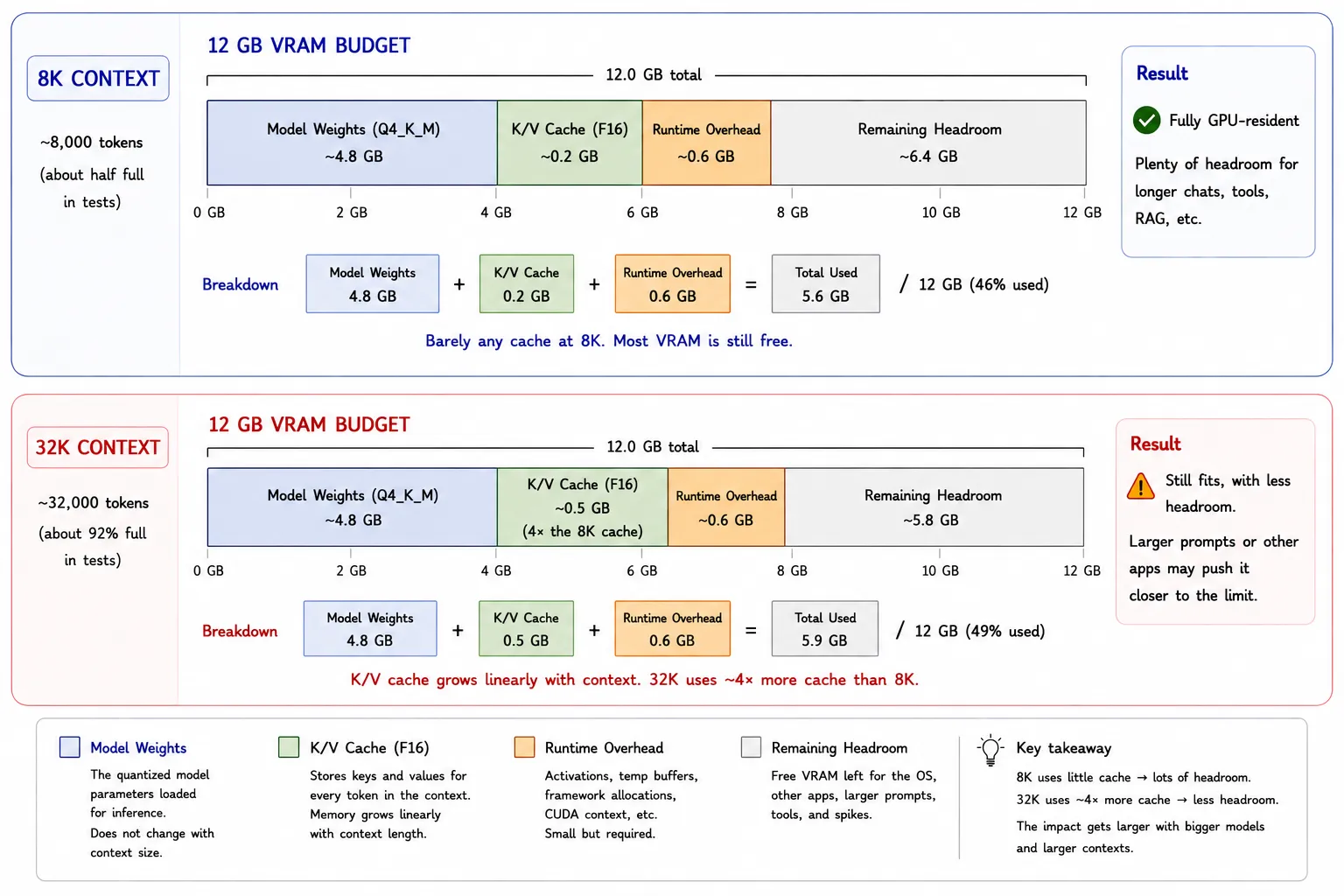
For the same model and cache precision, K/V-cache memory scales approximately linearly with active context length, so moving from 8K to 32K requires roughly four times the cache memory before rounding. That is why a setup that appears to fit based on model-file size alone can offload or become impractical as context grows.
For example, the planner estimates Gemma 4 E4B at 5.6 GB total VRAM with an 8K context window and 5.9 GB at 32K. Model weights remain 4.8 GB and runtime overhead remains 0.6 GB. The displayed K/V-cache estimate rises from 0.2 GB to 0.5 GB.
Context is four times larger at 32K, and K/V-cache memory scales linearly with it. The rounded values do not visibly show an exact fourfold increase because the underlying 8K estimate is below 0.2 GB; when that underlying value is multiplied by roughly four, the 32K estimate displays as 0.5 GB.
Gemma 4 E4B still retains substantial headroom on a 12 GB card at 32K. The difference between 8K and 32K is relatively small for this model, but models with larger K/V-cache requirements can lose substantially more headroom as context grows.
What “Fits” Actually Means
The verdicts in this guide describe practical memory fit, not whether a runner can technically start a process.
- Comfortable: Fully GPU-resident with useful room for context and ordinary desktop use.
- Fits with tradeoffs: Requires lower quantization, reduced context, or less multitasking.
- CPU offload likely: May run by placing part of the model in system RAM, usually with a substantial speed cost.
- Not practical: Does not have enough GPU-resident memory for the listed model and context to be a sensible default.
System RAM remains useful for loading models, document indexes, and offloading layers. It does not make an oversized model perform as if it were entirely in VRAM. Treat offloading as an experiment to measure, not as a replacement for capacity.
How Current 12 GB Models Compare
Gemma 4 E4B IT is the current top-rated model in this calculator snapshot. Qwen3 8B is another current general-purpose choice with a smaller advertised maximum context window. Neither number guarantees that a particular Ollama tag, GGUF build, or desktop workload will use the same memory.
DeepSeek R1 Distill Qwen 7B is the reasoning-focused entry in the current list. Qwen3-VL-8B-Instruct is the image-aware option, and Gemma 4 E2B IT is the smaller fast alternative. The calculator also lists Qwen3.5 35B A3B as a 26 GB, “Barely runs” option for this profile; that is an offload experiment, not a 12 GB recommendation.
With Ollama, start by choosing an explicitly quantized tag that matches the memory budget, then check actual placement after loading it. Do not infer the expected memory use from a model family name or parameter count alone.
Recommended Starting Settings for a 12 GB GPU
Start conservatively, verify that the model remains GPU-resident, then raise the context window only if the workload needs it. These are starting points rather than quality rankings or universal settings.
| Workload | Model class | Recommended quantization | Context target | K/V cache | What to expect |
|---|---|---|---|---|---|
| General chat | Gemma 4 E4B or Qwen3 8B | Runtime-supported 4 to 5-bit build | 8K to 16K | F16 | "Start with a compact current model and increase context only after checking real VRAM use." |
| Coding assistant | Qwen3 8B | Runtime-supported 4 to 5-bit build | 8K to 16K | F16 | "Repository context and tool output can consume the headroom that makes a short chat look comfortable." |
| Reasoning | DeepSeek R1 Distill Qwen 7B | Runtime-supported 4 to 5-bit build | 8K to 16K | F16 | "Reasoning traces can consume more context; check the full workflow rather than only a short prompt." |
| Vision | Qwen3-VL-8B-Instruct | Runtime-compatible quantized build | 8K to 16K | F16 | "Image input and long context make this a tighter 12 GB fit; verify actual placement and speed." |
| Fast smaller tasks | Gemma 4 E2B | Runtime-supported quantized build | 8K to 16K | F16 | "The smaller model leaves more capacity for context and ordinary desktop use." |
The K/V-cache choice matters most as context rises. Q8_0 halves cache memory relative to F16 in the planner; Q4_0 saves more but may have an output-quality tradeoff. Keep the model quantization and K/V-cache setting distinct: one affects model weights and the other affects context memory.